- Client libraries setup
- Device connect API
- Device disconnect API
- Attributes API
- Telemetry upload API
- RPC API
- Claiming devices API
- Protocol customization
- Next steps
A Gateway in SENTIENT is a special type of device that acts as a bridge between external devices and the platform. It maintains a single MQTT connection to SENTIENT while proxying data for multiple physical devices connected behind it.
The gateway itself is also a standard SENTIENT device. It can use the MQTT Device API to:
- Publish its own telemetry and attributes
- Receive configuration updates
- Execute RPC commands
In addition, this API defines gateway-specific MQTT topics and payload formats and is used by the open-source SENTIENT IoT Gateway.

For device-level MQTT details (authentication, QoS, payload format, etc.), refer to the MQTT Device API.
Client libraries setup
Many MQTT client libraries are available for different platforms and languages.
The examples in this guide use:
• Mosquitto (command-line tools)
• MQTT.js (JavaScript)
Use the instructions below to install the following command-line utilities:
• mosquitto_pub
• mosquitto_sub
Select your operating system to continue with the installation steps:
|
Install mqtt client for Ubuntu: Install cURL for macOS: |
|
Use the instructions listed below to download, install, setup and run mosquitto_pub in Windows:
To add the Mosquitto directory to the “Path” variable, follow these steps:
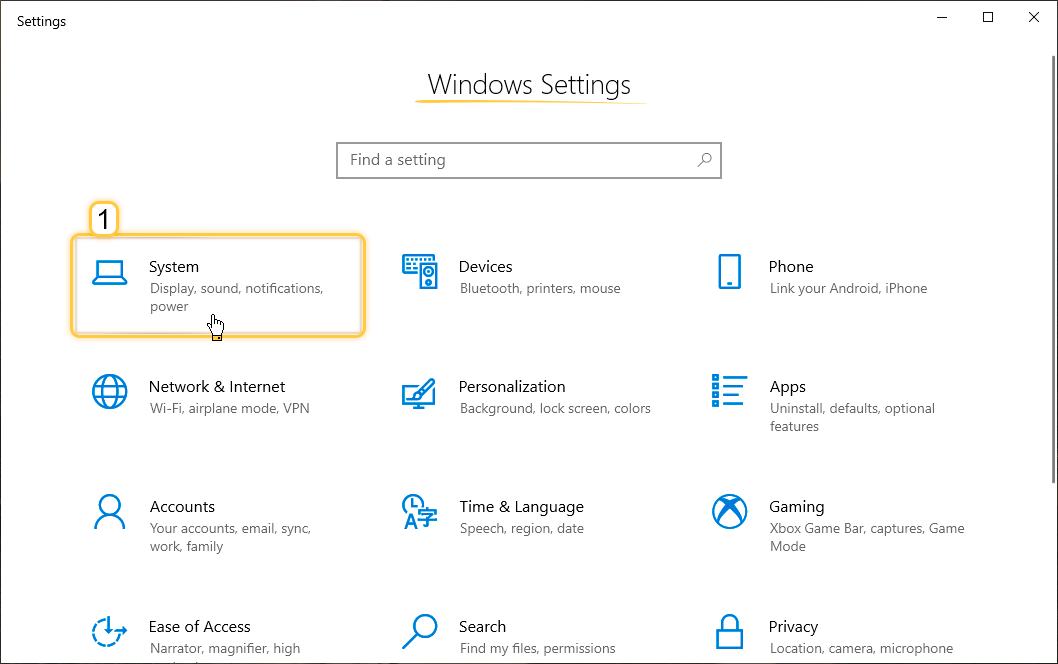 Press the Win + X, then select “System”. Then click on the “System” page; 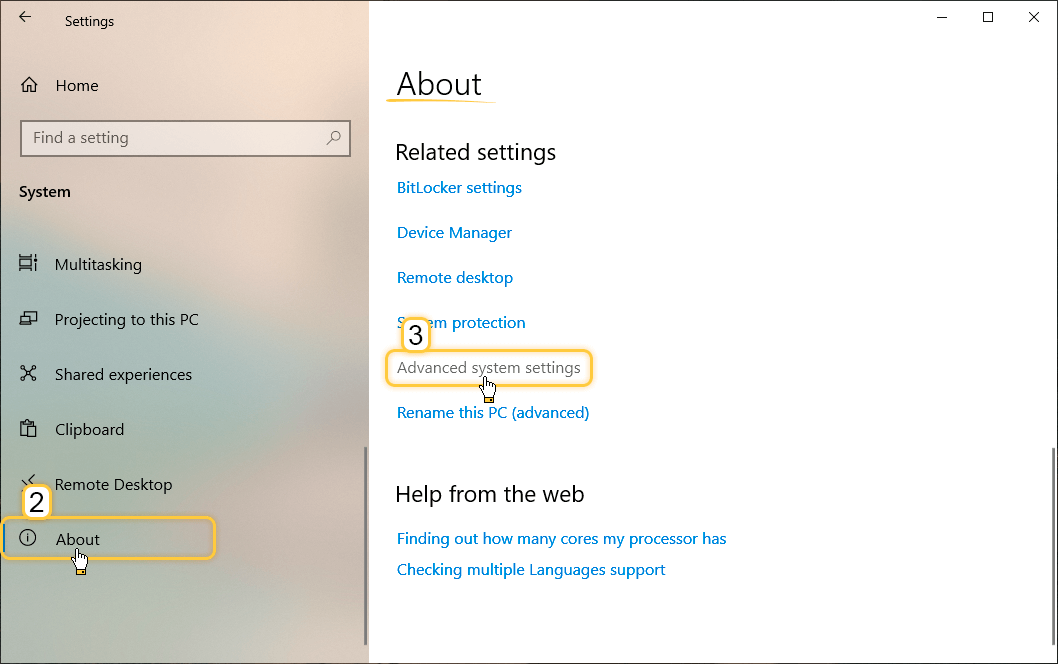 Navigate to the “About” section, then click “Advanced system settings”; 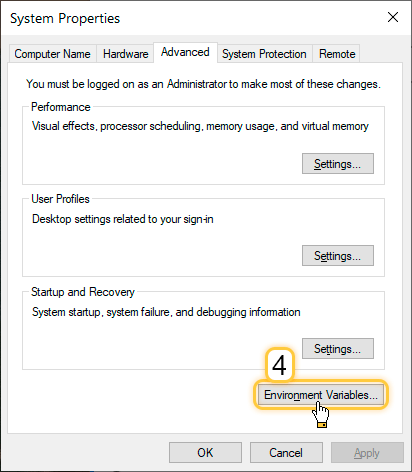 In the “System Properties” pop-up window, click “Environment Variables” button on the “Advanced” tab; 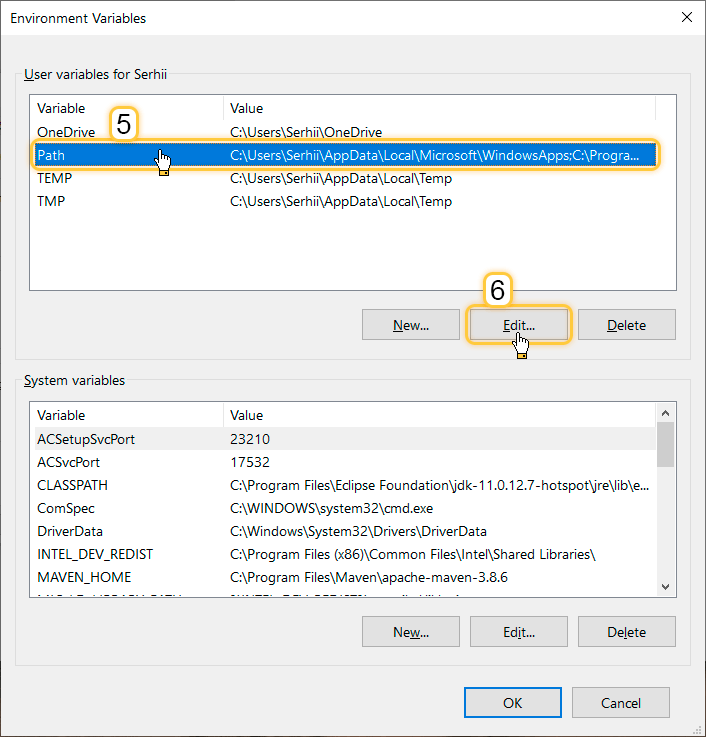 In the “Environment Variables” pop-up window, select the “Path”, then click on the “Edit” button; 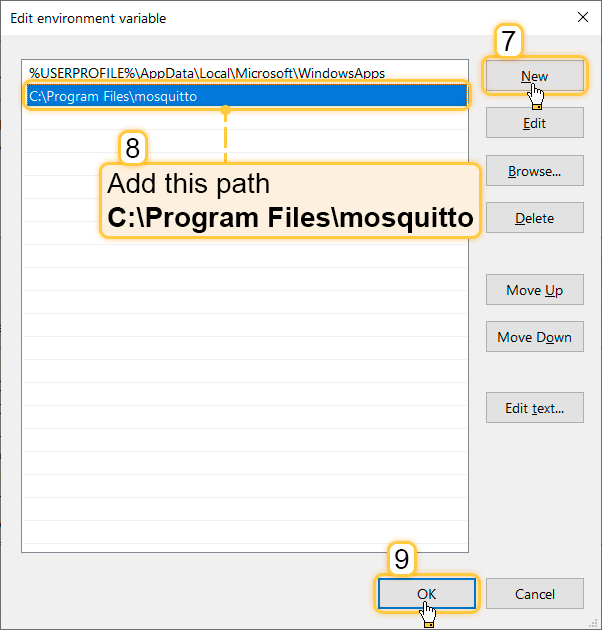 In the “Edit environment variable” pop-up window click on the “New” button and add the path to the directory containing 'mosquitto_pub.exe' and 'mosquitto_sub.exe' ('C:\Program Files\mosquitto' by default). Click “OK” button; 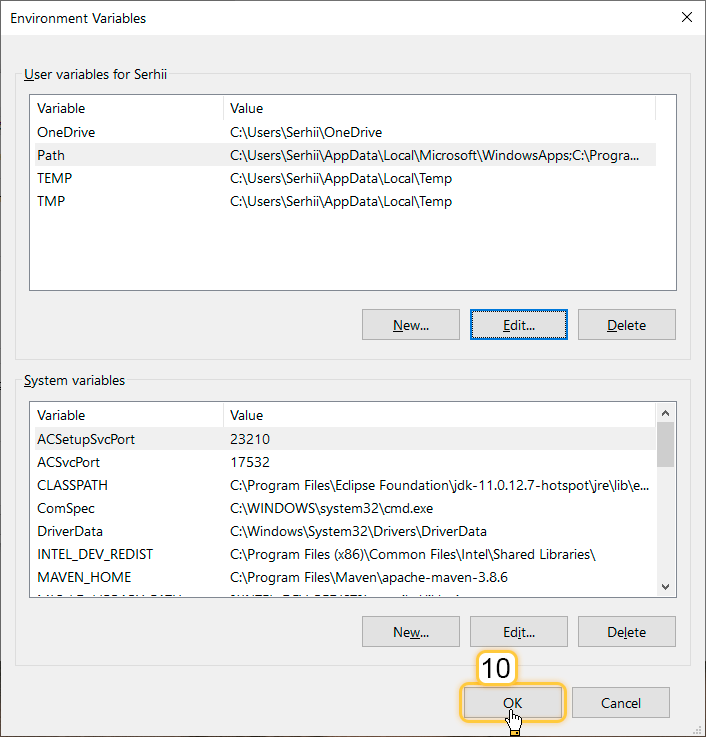 Click “OK” button to save changes in the environment variables; 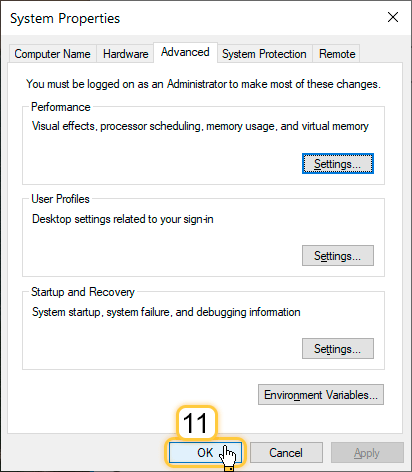 Finally, click “OK” button to apply all changes in the system properties. |
Device connect API
Use this API to inform SENTIENT that a device behind the Gateway is now connected and ready to exchange data.
Topic:
1
v1/gateway/connect
Payload:
1
{"device": "Device A", "type": "Sensor A"}
- device - required. The device name in SENTIENT.
- type – optional. Name of the device profile. If omitted, the
defaultdevice profile is used.
Behavior:
- If a device with the given name does not exist, SENTIENT creates it automatically.
- If the device profile name is provided and the profile does not exist, SENTIENT creates it automatically.
- Once connected, SENTIENT routes the following events for this device through the Gateway:
- Updates to shared attributes.
- RPC commands.
Only for MQTT v.5
It is recommended to wait for the PUBACK response to ensure that the device connection was successful. If something goes wrong during the connection, for example, the device limit is exceeded, the PUBACK will return with the corresponding status code.
Examples
⚠️ In all examples on this page, the hostname refers to a local SENTIENT installation.
If your SENTIENT instance is deployed on a different host, replacelocalhostwith the appropriate hostname or IP address.
Don't forget to replace
$ACCESS_TOKENwith your gateway device access token.
Example 1. Connect a device.
In order to inform SENTIENT that device is connected to the Gateway, one needs to publish following message:
1
mosquitto_pub -h "localhost" -t "v1/gateway/connect" -u "$ACCESS_TOKEN" -m '{"device": "Device A"}'
Example 2. Connect a device with a specific device profile.
In order to inform SENTIENT that device is connected to the Gateway with a specific device profile, one needs to publish following message:
1
mosquitto_pub -h "localhost" -t "v1/gateway/connect" -u "$ACCESS_TOKEN" -m '{"device": "Device A", "type": "Sensor A"}'
Device disconnect API
Use this API to inform SENTIENT that a device behind the Gateway is no longer active.
Topic:
1
v1/gateway/disconnect
Payload:
1
{"device": "Device A"}
Behavior:
- If the device with the given name does not exist, SENTIENT ignores the message.
- After processing this message, SENTIENT stops sending attribute and RPC updates for that device to the Gateway.
Only for MQTT v.5
If something goes wrong during the disconnecting, the PUBACK will return with the corresponding status code.
Example
⚠️ Replace
$ACCESS_TOKENwith your gateway device access token.
Also, make sure that the device is connected before disconnecting it.
In order to inform SENTIENT that device is disconnected from the Gateway, one needs to publish following message:
1
mosquitto_pub -h "localhost" -t "v1/gateway/disconnect" -u "$ACCESS_TOKEN" -m '{"device": "Device A"}'
Attributes API
SENTIENT attributes API allows devices to:
- Upload client-side device attributes to the server.
- Request client-side and shared device attributes from SENTIENT platform.
- Subscribe to shared device attributes from SENTIENT platform.
Publish attribute to SENTIENT
Use this topic to publish client-side device attributes to SENTIENT platform. All attributes in the payload are stored as client-side attributes for the corresponding devices.
Topic:
1
v1/gateway/attributes
Payload:
1
2
3
4
5
6
7
8
9
10
{
  "Device A": {
    "attribute1": "value1",
    "attribute2": 42
  },
  "Device B": {
    "attribute1": "value1",
    "attribute2": 42
  }
}
Behavior:
- If the device with the given name does not exist, SENTIENT creates it automatically with
defaultprofile name. - If the attribute does not exist, it is created.
- If the attribute already exists, its value is updated.
Only for MQTT v.5
If something goes wrong during the publishing, the PUBACK will return with the corresponding status code.
Example
⚠️ Replace
$ACCESS_TOKENwith your gateway device access token.
In order to publish client-side device attributes to SENTIENT platform, one needs to publish following message:
1
mosquitto_pub -h "localhost" -t "v1/gateway/attributes" -u "$ACCESS_TOKEN" -m '{"Device A": { "fw_version": "1.0", "battery": 87 }}'
Request attribute values from SENTIENT
Use this API to request client-side or shared device attributes from SENTIENT platform. Make attention that you need to subscribe to the response topic first in order to receive the response.
Subscribe topic:
1
v1/gateway/attributes/response
Publish topic:
1
v1/gateway/attributes/request
Payload:
1
2
3
4
5
6
{
  "id": "$request_id",
  "device": "Device A",
  "client": ["key1", "key2"],
  "shared": ["key3", "key4"]
}
Fields:
- id – required. Your integer request identifier.
- device – required. The device name in SENTIENT.
- client – optional. An array of client-side attribute keys to request.
- shared – optional. An array of shared attribute keys to request.
Subscribe to attribute updates from SENTIENT
Use this topic to subscribe to shared device attribute changes. Take attention that you need to subscribe to the topic first in order to receive updates.
Subscribe topic:
1
v1/gateway/attributes
Response message format:
1
2
3
4
5
6
7
{
  "device": "Device A",
  "data": {
    "attribute1": "value1",
    "attribute2": 42
  }
}
Fields:
- device – the device name in SENTIENT.
- data – map of updated shared attributes.
Telemetry upload API
Use this API to publish telemetry for one or more devices in a single MQTT message.
Topic:
1
v1/gateway/telemetry
Payload:
1
2
3
4
5
6
7
8
9
10
11
12
13
14
15
16
17
18
19
20
21
22
23
24
25
26
27
{
  "Device A": [
    {
      "ts": 1483228800000,
      "values": {
        "temperature": 42,
        "humidity": 80
      }
    },
    {
      "ts": 1483228801000,
      "values": {
        "temperature": 43,
        "humidity": 82
      }
    }
  ],
  "Device B": [
    {
      "ts": 1483228800000,
      "values": {
        "temperature": 42,
        "humidity": 80
      }
    }
  ]
}
Fields:
- device – required. The device name in SENTIENT.
- ts – Optional. Unix timestamp in milliseconds.
- values – required. Key-value map of telemetry fields (e.g., temperature, humidity).
Behavior:
- If the device with the given name does not exist, SENTIENT creates it automatically with
defaultprofile name. - If the telemetry keys do not exist, they are created.
- Telemetry data is stored with the provided timestamps.
Only for MQTT v.5
If something goes wrong during the publishing, the PUBACK will return with the corresponding status code.
Example
⚠️ Replace
$ACCESS_TOKENwith your gateway device access token.
In order to publish device telemetry to SENTIENT platform, one needs to publish following message:
1
mosquitto_pub -h "localhost" -t "v1/gateway/telemetry" -u "$ACCESS_TOKEN" -m '{"Device A": [{"ts": 1700000000000, "values": {"temperature": 23.5, "humidity": 61 }}]}'
RPC API
Server-side RPC
Use this API to receive and respond to RPC commands from SENTIENT for devices behind the Gateway.
Subscribe topic:
1
v1/gateway/rpc
Request message format:
1
{"device": "Device A", "data": {"id": $request_id, "method": "toggle_gpio", "params": {"pin": 1}}}
Response topic:
1
v1/gateway/rpc
Response message format:
1
{"device": "Device A", "id": $request_id, "data": {"success": true}}
Fields:
- device – the device name in SENTIENT.
- id – your integer request identifier.
- data – response payload.
You need to subscribe to the request topic first in order to receive RPC commands. After processing the RPC command, you can publish the response message to the response topic.
Make sure that device is connected via the Gateway to receive RPC commands for it.
Make attention that the id in the response message should match the id from the request message.
Claiming devices API
SENTIENT supports a claiming mechanism that allows end users to take ownership of pre-provisioned devices. For conceptual details, see Claiming devices guide.
Topic:
1
v1/gateway/claim
Payload:
1
2
3
4
5
6
7
8
9
10
{
  "Device A": {
    "secretKey": "value_A",
    "durationMs": 60000
  },
  "Device B": {
    "secretKey": "value_B",
    "durationMs": 60000
  }
}
Per-device parameters:
- secretKey – optional. The secret key assigned to the device for claiming. If omitted, an empty string is used.
- durationMs – optional. Claiming duration in milliseconds. If omitted, the system parameter device.claim.duration is used (in the file /etc/sentient/conf/sentient.yml).
Example
⚠️ Replace
$ACCESS_TOKENwith your gateway device access token.
Also, make sure that the device is connected before testing claiming.
In order to inform SENTIENT platform to start claiming process for devices, one needs to publish following message:
1
mosquitto_pub -h "localhost" -t "v1/gateway/claim" -u "$ACCESS_TOKEN" -m '{"Device A": {"secretKey": "mySecret", "durationMs": 60000}}'
Protocol customization
MQTT transport can be fully customized for specific use-case by changing the corresponding module.
Next steps
-
Getting started guides - These guides provide quick overview of main SENTIENT features. Designed to be completed in 15-30 minutes.
-
Data visualization - These guides contain instructions on how to configure complex SENTIENT dashboards.
-
Data processing & actions - Learn how to use SENTIENT Rule Engine.
-
IoT Data analytics - Learn how to use rule engine to perform basic analytics tasks.
-
Advanced features - Learn about advanced SENTIENT features.
-
Contribution and Development - Learn about contribution and development in SENTIENT.