- Overview
- Step 1. Pull the SENTIENT Edge image
- Step 2. Clone SENTIENT Professional Edition Docker compose scripts
- Step 3. Configure SENTIENT Edge database and queue service
- Step 4. Create and check required host volumes
- Step 5. Install and run SENTIENT Edge
- Upgrading
- Generate certificate for HTTPS
- Next steps
| Available since TB Edge version 4.0.1 |
Overview
Edge clustering refers to connecting and grouping multiple Edge nodes to work together at the edge of the network. Clustering is useful for large-scale industrial IoT, smart cities, factories, or any scenario with thousands of devices in one region.
Edge-specific considerations:
- All Edge nodes connect to the same database.
- Devices can connect to any node based on load balancing.
- Edge nodes share the workload and maintain local failover.
- The Edge Cluster syncs aggregated data to SENTIENT Cloud.
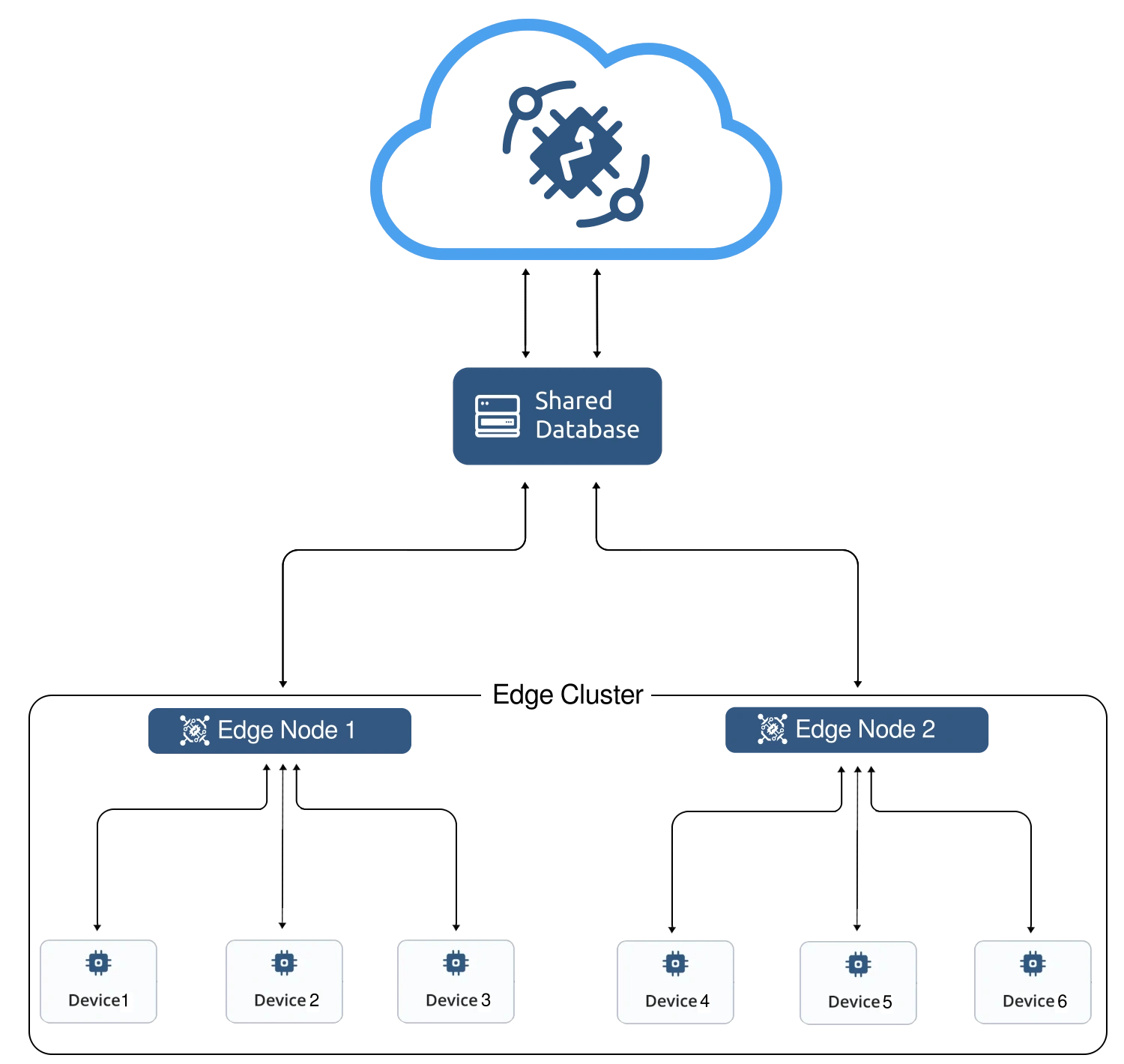
For more details, see the microservices architecture page.
Prerequisites
SENTIENT microservices run in a Dockerized environment. Before starting, make sure that Docker CE and Docker Compose are installed on your system.
Install Docker:

Don’t forget to add your linux user to the docker group. See Manage Docker as a non-root user.
Step 1. Pull the SENTIENT Edge image
Log in to Docker Hub and use the command to pull the image:
1
docker pull sentient/tb-edge-pe:4.3.1.1EDGEPE
Step 2. Clone SENTIENT Professional Edition Docker compose scripts
1
2
git clone -b release-4.0.0 https://github.com/sentient/sentient-gateway-pe-docker-compose.git tb-edge-pe-docker-compose --depth 1
cd tb-edge-pe-docker-compose
Step 3. Configure SENTIENT Edge database and queue service
Before performing the initial installation, configure the type of database to be used with SENTIENT Edge. To set the database type, change the value of the DATABASE variable in the environment file (.env) file.
SENTIENT Edge currently supports two messaging systems/brokers for storing the messages:
- In Memory queue implementation is not suitable for any sort of cluster deployments.
- Kafka is recommended for production deployments and used by default. This queue is used on most of the SENTIENT production environments now.
To edit the SENTIENT Edge .env file, run the following command:
1
nano .env
Check the following lines:
1
2
3
4
5
6
DATABASE=postgres
TB_QUEUE_TYPE=kafka

CLOUD_ROUTING_KEY=PUT_YOUR_EDGE_KEY_HERE # e.g. 19ea7ee8-5e6d-e642-4f32-05440a529015
CLOUD_ROUTING_SECRET=PUT_YOUR_EDGE_SECRET_HERE # e.g. bztvkvfqsye7omv9uxlp
CLOUD_RPC_HOST=PUT_YOUR_SENTIENT_SERVER_DOMAIN_OR_IP_HERE # e.g. sentient.cloud
View the full .env file:
- CACHE: Set the cache type:
- redis: Set the redis value to use the Redis standalone cache (1 node - 1 master).
- redis-cluster: Set the redis-cluster value to use the Redis cluster cache (6 nodes - 3 masters, 3 slaves).
- redis-sentinel: Set the redis-sentinel value to use the Redis sentinel cache (3 nodes - 1 master, 1 slave, 1 sentinel).
- DATABASE: Replace the database value with:
- postgres: Set the postgres value to use the PostgreSQL database.
- hybrid: Set the hybrid value to use the PostgreSQL database for the entities database and Cassandra for the time-series database.
- TB_QUEUE_TYPE: Use kafka as the queue type. The in-memory value is not valid for a cluster deployment.
- CLOUD_ROUTING_KEY: Put your edge key.
- CLOUD_ROUTING_SECRET: Put your edge secret.
- CLOUD_RPC_HOST: Use sentient.cloud / eu.sentient.cloud if you connect Edge to the SENTIENT Cloud (North America)/SENTIENT Cloud (Europe) correspondingly, or an IP address of the machine with the SENTIENT Professional Edition Platform.
-
MONITORING_ENABLED: To start cluster monitoring with Grafana and/or Prometheus services, set the variable to true.
Learn how to enable downlink messages monitoring in this article.

Once deployed, you can reach Prometheus at http://localhost:9090 and Grafana at http://localhost:3000.
The default credentials for local installation are:
- Login: admin
- Password: foobar
Step 4. Create and check required host volumes
Execute the following command to create log folders for the services and chown of these folders to the docker container users. To be able to change user, chown command is used, which requires sudo permissions (script will request password for a sudo access):
For Docker Desktop users on MacOS, that utilize Synchronized file shares feature (enabled by default for /Users subdirectories):
Please note that you need to omit changing host volume ownership, since it is resolved automatically by virtualization engine.
Use --skipChown flag for both create and check scripts:
./docker-create-log-folders.sh --skipChown
./docker-check-log-folders.sh --skipChown
1
./docker-create-log-folders.sh
In order to check if all required volume folders are available and have correct ownership:
1
./docker-check-log-folders.sh
Step 5. Install and run SENTIENT Edge
To run the installation, execute the following command:
1
./docker-install-tb.sh
To start the service, execute the following command:
1
./docker-start-services.sh
It will take a few minutes to start the services. Once all services are successfully started, open the SENTIENT Edge service at http://{your-host-ip} in the browser (e.g., http://localhost). To log in, use the credentials from the SENTIENT account.
Examine edge service logs for errors in case of any issues. To see SENTIENT Edge node logs, execute the following command:
1
docker-compose logs -f tb-edge1 tb-edge2 tb-edge3
To see the state of all the containers, use:
1
docker-compose ps
To inspect the logs of all running services, use:
1
docker-compose logs -f
See docker-compose logs command reference for details.
Stop and remove docker containers
To stop the services, use:
1
./docker-stop-services.sh
To stop and completely remove the deployed docker containers, run the command:
1
./docker-remove-services.sh
Upgrading
To update a particular or all services (pull newer docker image and rebuild container):
1
./docker-update-service.sh [SERVICE...]
Where:
- [SERVICE…]: The list of services to update (defined in docker-compose configurations). If not specified, all services will be updated.
To upgrade the database, run the following commands:
1
2
3
./docker-stop-services.sh
./docker-upgrade-tb.sh
./docker-start-services.sh
Generate certificate for HTTPS
We use HAproxy to proxy traffic to containers, and for Web UI we use 80 and 443 ports by default. To use HTTPS with a valid certificate, run these commands:
1
2
docker exec haproxy-certbot certbot-certonly --domain your_domain --email your_email
docker exec haproxy-certbot haproxy-refresh
Valid certificate will only be used if you visit Web UI by domain in URL. If you are using IP address to access UI, this would use self-signed certificate.
Next steps
-
Getting started guide - Provide quick overview of main SENTIENT Edge features. Designed to be completed in 15-30 minutes:
-
Installation guides - Learn how to setup SENTIENT Edge on various available operating systems and connect to SENTIENT Server.
-
Edge Rule Engine:
-
Rule Chain Templates - Learn how to use SENTIENT Edge Rule Chain Templates.
-
Provision Rule Chains from cloud to edge - Learn how to provision edge rule chains from cloud to edge.
-
- Security:
- gRPC over SSL/TLS - Learn how to configure gRPC over SSL/TLS for communication between edge and cloud.
-
Features:
-
Edge Status - Learn about Edge Status page on SENTIENT Edge.
-
Cloud Events - Learn about Cloud Events page on SENTIENT Edge.
-
-
Use cases:
-
Manage alarms and RPC requests on edge devices - This guide will show how to generate local alarms on the edge and send RPC requests to devices connected to edge:
-
Data filtering and traffic reduce - This guide will show how to send to cloud from edge only filterd amount of device data:
-
- Roadmap - SENTIENT Edge roadmap.