- How does the PROXY protocol work?
- When to use the protocol?
- How to enable the protocol?
- Considerations
The PROXY Protocol is a simple protocol used to safely transport connection information such as the client’s IP address across multiple layers of proxies or load balancers.
ST-RMQTT supports both PROXY Protocol v1 and v2, enabling it to receive and process the real client IP and port, which is critical for accurate auditing, rate limiting, access control, and understanding the actual source of client connections.
- PROXY Protocol v1: A human-readable ASCII-based format that prepends connection metadata (e.g., IP addresses and ports) to the TCP stream.
- PROXY Protocol v2: A more efficient binary format that provides the same information as v1 but with enhanced protocol support and better performance in high-throughput environments.
By using PROXY Protocol, ST-RMQTT can log, filter, and apply policies based on the real IP address of clients, which is otherwise masked by the proxy or load balancer.
How does the PROXY protocol work?
The PROXY Protocol appends meta-information about the original client connection at the very start of the TCP stream. This metadata is sent by the proxy or load balancer before any protocol-specific data, such as the MQTT CONNECT packet or the TLS handshake.
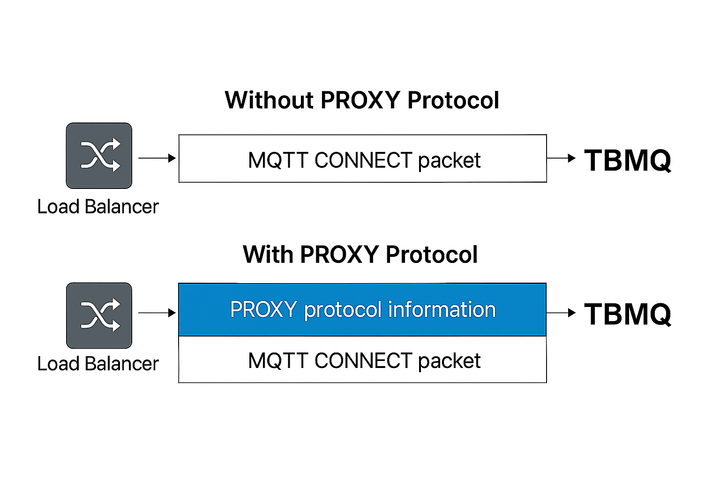
When a client connects to ST-RMQTT through a proxy that supports PROXY Protocol, the connection flow is as follows:
- The proxy accepts the TCP connection from the client.
- The proxy immediately sends a PROXY Protocol header containing:
- The client’s source IP and port.
- The proxy’s destination IP and port.
- The protocol type (TCP over IPv4 or IPv6).
- ST-RMQTT, with PROXY Protocol enabled, reads this header first, extracts the real client information, and then continues processing the application data:
- For plain MQTT/WS connections: ST-RMQTT processes the MQTT CONNECT packet next.
- For TLS-secured MQTT/WS connections: ST-RMQTT proceeds with the TLS handshake after parsing the header.
- In PROXY Protocol v1, this header is sent in ASCII format, e.g.:
1
PROXY TCP4 192.0.2.1 198.51.100.1 12345 1883\r\n
- In PROXY Protocol v2, the header is in a binary format, more compact and efficient for high-performance systems.
This means ST-RMQTT treats the very first bytes of every incoming connection as PROXY Protocol data, before interpreting it as an MQTT connection.
When to use the protocol?
You should enable the PROXY Protocol in ST-RMQTT when:
- ST-RMQTT is deployed behind a load balancer or reverse proxy (e.g., HAProxy, AWS NLB, NGINX) that supports the PROXY Protocol.
- You need to capture the real IP address of clients for:
- Accurate logging of client connection details.
- Applying IP-based security policies and rate limiting.
- Detailed auditing and analytics based on the true client origin.
ST-RMQTT stores the client IP address as part of the client session information. This IP address is also used in the Unauthorized Clients feature, where ST-RMQTT tracks connection attempts from clients that fail authentication. Having the correct IP address helps in identifying the source of unauthorized access attempts and improving security monitoring.
Without PROXY Protocol, ST-RMQTT will only see the IP of the proxy or load balancer, making it impossible to distinguish between individual clients behind the proxy. Enabling PROXY Protocol ensures ST-RMQTT receives the actual client IP and port at connection time.
Important: Do not enable PROXY Protocol unless your proxy is properly configured to send PROXY Protocol headers. When enabled, ST-RMQTT expects the PROXY Protocol header at the beginning of each TCP connection.
How to enable the protocol?
To enable PROXY Protocol support in ST-RMQTT, you need to update the configuration settings for MQTT listeners.
- Before ST-RMQTT v2.3: The PROXY Protocol setting applies globally to all MQTT listeners in ST-RMQTT and cannot be configured per listener.
1
2
3
4
5
# MQTT listeners parameters
listener:
  # Enable proxy protocol support. Disabled by default. If enabled, supports both v1 and v2.
  # Useful to get the real IP address of the client in the logs, for session details info and unauthorized clients feature
  proxy_enabled: "${MQTT_PROXY_PROTOCOL_ENABLED:false}"
Set the environment variable MQTT_PROXY_PROTOCOL_ENABLED to “true”.
- Since ST-RMQTT v2.3: In addition to the global setting, you can also configure PROXY Protocol per MQTT listener. Per-listener settings are unset by default and inherit the global value. If explicitly set, the per-listener value overrides the global one.
1
2
3
4
5
6
7
8
9
10
11
12
13
14
15
16
17
18
19
20
21
22
23
24
25
26
27
# MQTT listeners parameters
listener:
  # Enable proxy protocol support as a global setting for all listeners. Disabled by default. If enabled, supports both v1 and v2.
  # Useful to get the real IP address of the client in the logs, for session details info and unauthorized clients feature
  proxy_enabled: "${MQTT_PROXY_PROTOCOL_ENABLED:false}"

# Per-listener overrides (inherit global if unset)
  tcp:
    # Enable proxy protocol support for the MQTT TCP listener. Unset by default – in this case it inherits the global MQTT_PROXY_PROTOCOL_ENABLED value.
    # If explicitly set, supports both v1 and v2 and takes precedence over the global setting.
    # Useful to get the real IP address of the client in the logs, for session details info and unauthorized clients feature
    proxy_enabled: "${MQTT_TCP_PROXY_PROTOCOL_ENABLED:}"
  ssl:
    # Enable proxy protocol support for the MQTT TLS listener. Unset by default – in this case it inherits the global MQTT_PROXY_PROTOCOL_ENABLED value.
    # If explicitly set, supports both v1 and v2 and takes precedence over the global setting.
    # Useful to get the real IP address of the client in the logs, for session details info and unauthorized clients feature
    proxy_enabled: "${MQTT_SSL_PROXY_PROTOCOL_ENABLED:}"
  ws:
    # Enable proxy protocol support for the MQTT WS listener. Unset by default – in this case it inherits the global MQTT_PROXY_PROTOCOL_ENABLED value.
    # If explicitly set, supports both v1 and v2 and takes precedence over the global setting.
    # Useful to get the real IP address of the client in the logs, for session details info and unauthorized clients feature
    proxy_enabled: "${MQTT_WS_PROXY_PROTOCOL_ENABLED:}"
  wss:
    # Enable proxy protocol support for the MQTT WSS listener. Unset by default – in this case it inherits the global MQTT_PROXY_PROTOCOL_ENABLED value.
    # If explicitly set, supports both v1 and v2 and takes precedence over the global setting.
    # Useful to get the real IP address of the client in the logs, for session details info and unauthorized clients feature
    proxy_enabled: "${MQTT_WSS_PROXY_PROTOCOL_ENABLED:}"
Example
1
2
3
MQTT_PROXY_PROTOCOL_ENABLED=true        # PROXY protocol is globally enabled
MQTT_TCP_PROXY_PROTOCOL_ENABLED=false   # MQTT TCP listener explicitly disable PROXY protocol -> disabled
MQTT_SSL_PROXY_PROTOCOL_ENABLED=        # TLS listener has PROXY protocol setting unset thus it inherits global setting -> enabled
Important Notes:
- When
proxy_enabledis set totrue, ST-RMQTT automatically supports both PROXY Protocol v1 and v2. - This setting ensures that ST-RMQTT correctly interprets the PROXY Protocol headers sent at the start of each TCP connection, before any MQTT or TLS-specific data.
HAProxy
To forward the real client IP to ST-RMQTT using PROXY Protocol, configure HAProxy as follows:
1
server st-rmqtt1 192.168.1.100:1883 send-proxy
send-proxy: Instructs HAProxy to send PROXY Protocol v1 headers to ST-RMQTT.- Replace
192.168.1.100:1883with your ST-RMQTT broker’s IP and port.
To use PROXY Protocol v2, change to:
1
server st-rmqtt1 192.168.1.100:1883 send-proxy-v2
send-proxy-v2: Sends PROXY Protocol v2 headers to ST-RMQTT.
You can find the full HAProxy configuration guide for enabling PROXY Protocol here.
AWS Network Load Balancer (NLB)
To use PROXY Protocol with AWS NLB, enable PROXY Protocol v2:
- Ensure your NLB is TCP or TLS type.
- Enable PROXY Protocol v2 using the AWS CLI:
1
2
3
aws elbv2 modify-target-group-attributes \
 --target-group-arn <your-target-group-arn> \
 --attributes Key=proxy_protocol_v2.enabled,Value=true
Note: AWS NLB only supports PROXY Protocol v2.
Alternatively, to enable PROXY Protocol v2 with AWS NLB in a Kubernetes environment, add the following annotation to your Service definition:
1
service.beta.kubernetes.io/aws-load-balancer-proxy-protocol: "*"
- The
*enables PROXY Protocol v2 for all source IPs.
See official AWS documentation for more details.
Other Load Balancers
You are not limited to HAProxy or AWS NLB — any load balancer that supports the PROXY Protocol can be used with ST-RMQTT. Examples include Google Cloud Load Balancer, Azure Load Balancer, NGINX, or other reverse proxies.
The setup steps are straightforward:
- Enable PROXY Protocol on your chosen load balancer according to its official documentation.
- Enable PROXY Protocol on the ST-RMQTT side (globally or per-listener, depending on your version).
Once both sides are properly configured, ST-RMQTT will correctly interpret the PROXY Protocol headers and capture the real client IP and port, regardless of which load balancer you use.
Considerations
- If PROXY Protocol is enabled in ST-RMQTT but not used by your proxy/load balancer, ST-RMQTT will fail to interpret the initial bytes, potentially rejecting the connection.
- If PROXY Protocol is disabled in ST-RMQTT but enabled on your proxy/load balancer, ST-RMQTT will misinterpret the PROXY Protocol header as part of the MQTT or TLS data, leading to connection errors or protocol parsing failures.
- Ensure all connections to ST-RMQTT are routed through a properly configured proxy when PROXY Protocol support is enabled.
- PROXY Protocol should only be enabled if ST-RMQTT is deployed behind a trusted proxy, as it allows the proxy to define client IPs.
Note: ST-RMQTT is not protocol-agnostic regarding PROXY Protocol support. When PROXY Protocol is enabled, all connections must include the PROXY header. Mixing connections with and without the PROXY header on the same listener is not supported. Future releases may introduce more flexible handling to support mixed connection types.