All visualizations created in SENTIENT ANALYTICS could be added on SENTIENT Dashboards.
We created special Advanced analytics Bundle for SENTIENT - widgets collection that should be imported into SENTIENT Widgets library.
You can use them to add views from SENTIENT ANALYTICS into SENTIENT dashboards and share analysis results with other users.

From SENTIENT 4.3+ and SENTIENT ANALYTICS 1.15+, the bundle name is Advanced analytics Bundle, and this bundle is a system bundle.
For older versions, you can find the bundle at the tenant level with the name SENTIENT ANALYTICS Bundle (after successful import).
Import Advanced analytics Bundle
SENTIENT 4.3+ and SENTIENT ANALYTICS 1.15+
Starting from SENTIENT 4.3 and SENTIENT ANALYTICS 1.15, SENTIENT ANALYTICS widgets are now managed at the sysadmin level and are upgraded automatically. Starting from these versions, there are no additional actions required from the user to import this bundle. The only requirement is: SENTIENT ANALYTICS should be connected to SENTIENT. You can find out how to do it here.
If SENTIENT ANALYTICS is synced with SENTIENT, you can find the system bundle Advanced analytics Bundle in the Widgets library.
SENTIENT 3.4+ and SENTIENT ANALYTICS 1.9+
You can import SENTIENT ANALYTICS bundle to the SENTIENT via SENTIENT ANALYTICS UI:
- Open SENTIENT ANALYTICS settings page as tenant administrator
- Scroll to
SENTIENT ANALYTICS Widget Bundle Managementsection - Press
Upload bundlebutton to add SENTIENT ANALYTICS widget library to the SENTIENT. - In case when SENTIENT already contains
SENTIENT ANALYTICS bundlebut it is not up-to-date, theUpload bundlebutton would apply the latest changes.
SENTIENT 3.3+ and SENTIENT ANALYTICS 1.8+
Starting from SENTIENT 3.3 and SENTIENT ANALYTICS 1.8 - SENTIENT ANALYTICS widgets can be natively embedded into the SENTIENT dashboard. Native SENTIENT ANALYTICS widgets works much faster compared to original SENTIENT ANALYTICS widgets that are based on iFrame.
Add native SENTIENT ANALYTICS library into SENTIENT extensions:
- Download Native SENTIENT ANALYTICS Library
- Deploy library into SENTIENT extension directory
1
2
3
4
5
6
scp sentient-analytics-tb-lib-1.8.0-SNAPSHOT.jar ubuntu@${SENTIENT_SERVER}:~/.

ssh ${SENTIENT_SERVER}

sudo cp sentient-analytics-tb-lib-1.0.0-SNAPSHOT.jar /usr/share/sentient/extensions/
sudo chown sentient:sentient /usr/share/sentient/extensions/sentient-analytics-tb-lib-1.0.0-SNAPSHOT.jar
- Restart SENTIENT service to apply changes
1
sudo service sentient restart
Import Native SENTIENT ANALYTICS widgets bundle
- Download Native_SENTIENT ANALYTICS_widgets_bundle
- Login as Tenant Administrator into SENTIENT and go to Widget Library
- Press Add new widget bundle and select import widget bundle
- Import downloaded widget bundle
SENTIENT 3.0 - 3.2
- Download a SENTIENT ANALYTICS_widgets_bundle V3
- Login as Tenant Administrator into SENTIENT and go to Widget Library
- Press Add new widget bundle and select import widget bundle
- Import downloaded widget bundle
SENTIENT 2.x
- Download a SENTIENT ANALYTICS_widgets_bundle V2
- Login as Tenant Administrator into SENTIENT and go to Widget Library
- Press Add new widget bundle and select import widget bundle
- Import downloaded widget bundle
This bundle contains 4 widgets:
- SENTIENT ANALYTICS View Static- allow adding saved SENTIENT ANALYTICS visualizations into SENTIENT dashboards
- SENTIENT ANALYTICS View Latest- similar to previous but also support dashboard aliases for resolving entities
- SENTIENT ANALYTICS Chat Assitant - is an interactive tool that allows users to engage in chat-based sessions for quick data retrieval and analysis.
- SENTIENT ANALYTICS Builder (Deprecated) - SENTIENT ANALYTICS Visualization Builder for providing self-service interface to your end-users, so they can create their own analysis using SENTIENT dashboard.
Note: If after importing SENTIENT ANALYTICS Widget Bundle into SENTIENT, widgets do not work and white screen with error displayed - double-check that correct bundle was imported. Widget API in SENTIENT v2.x and v3.x is different. Ensure that you downloaded bundle for the correct SENTIENT version.
Troubleshooting
SENTIENT 3.5+ blank widget with error
Starting from SENTIENT 3.5 we are using Angular 15 and link to library should be updated because standard link loads library that is based on Angluar 12, and it is not compatible with Angular 15. To solve the problem you should follow next steps:
- Update SENTIENT ANALYTICS to the latest version (1.10.1 or higher). If you are using SENTIENT ANALYTICS Cloud just skip this step.
- Login to SENTIENT as Tenant administrator
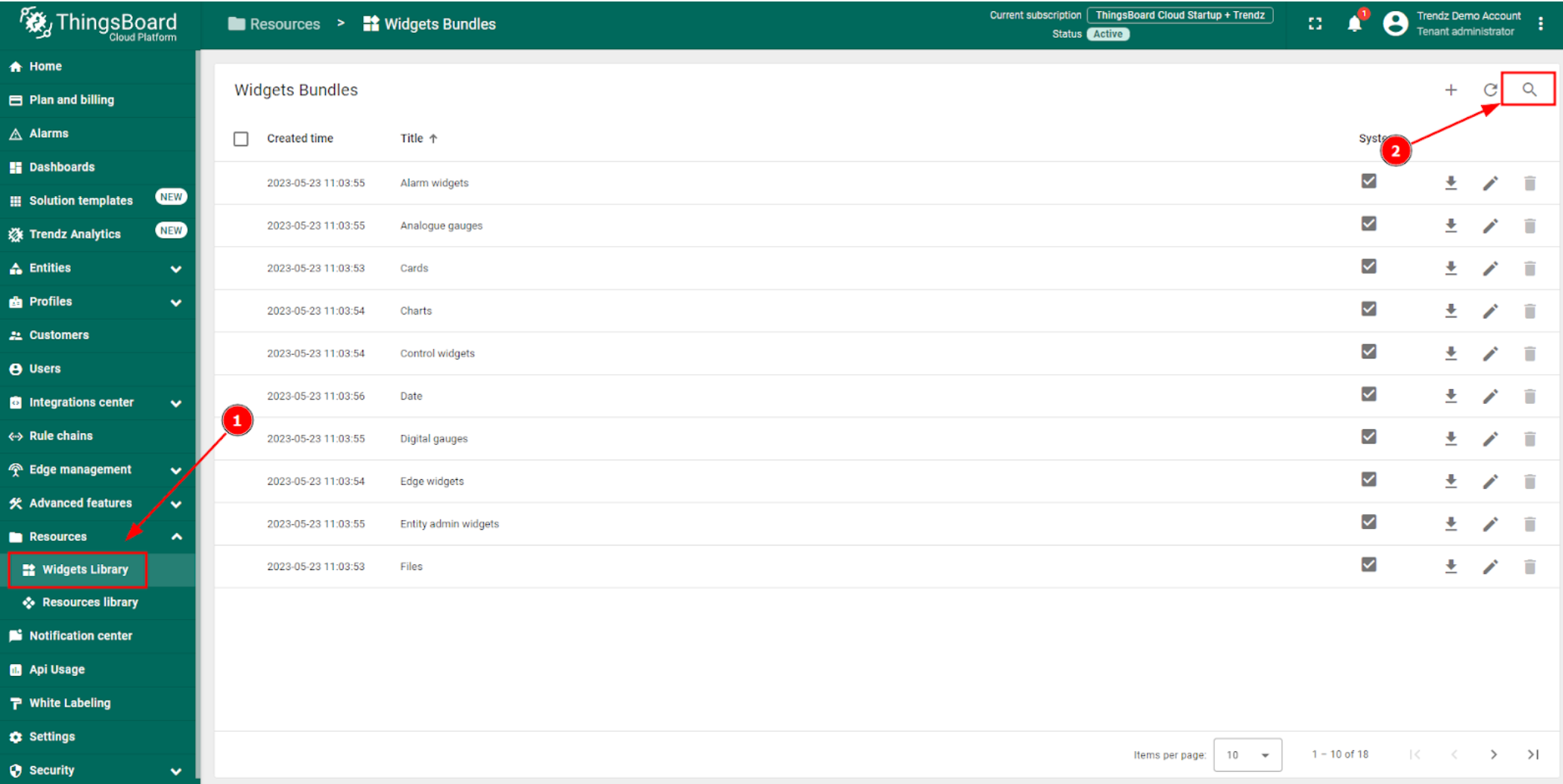
- Navigate to Resources -> Widgets Library
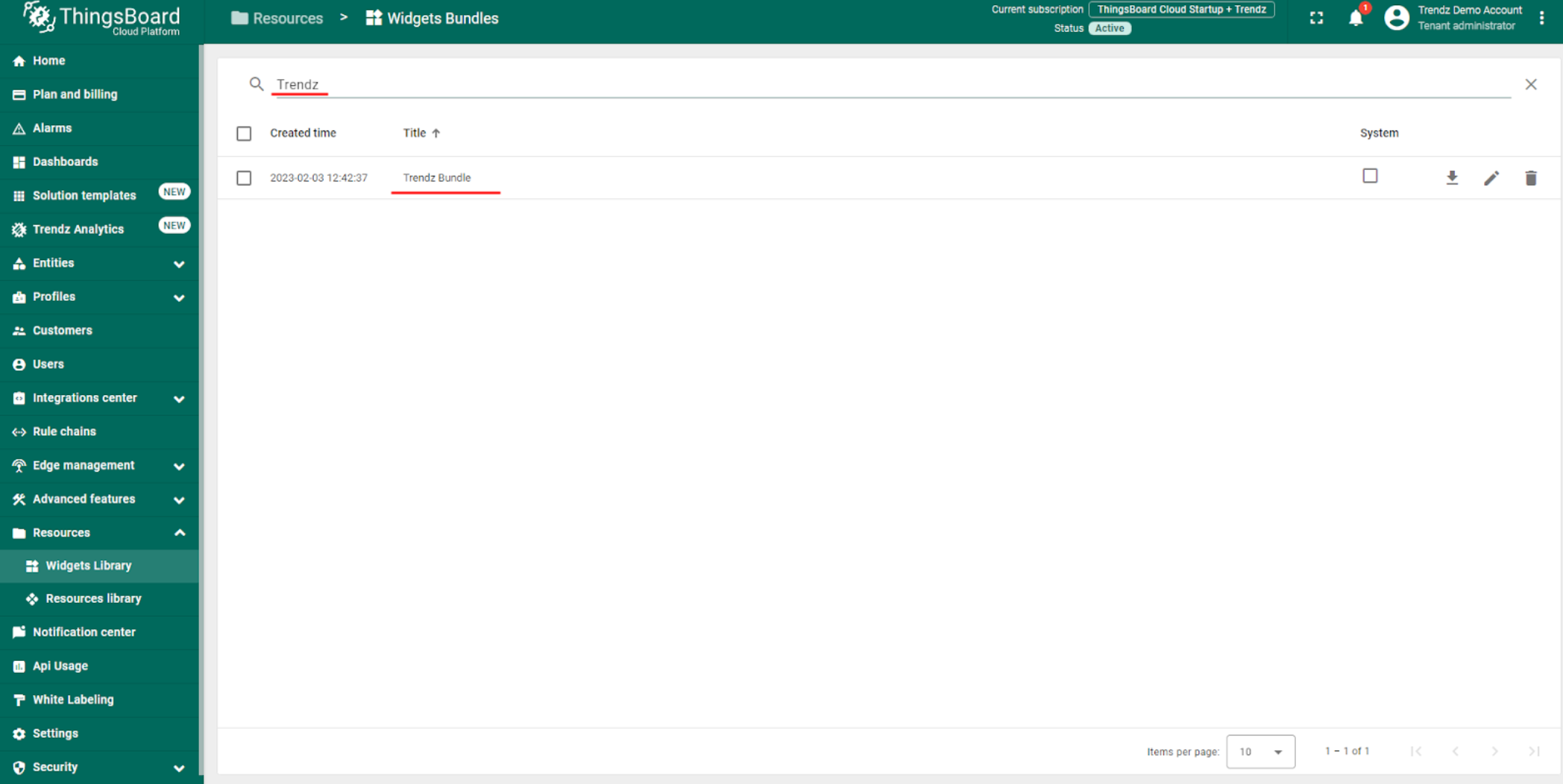
- Select and Edit SENTIENT ANALYTICS Bundle
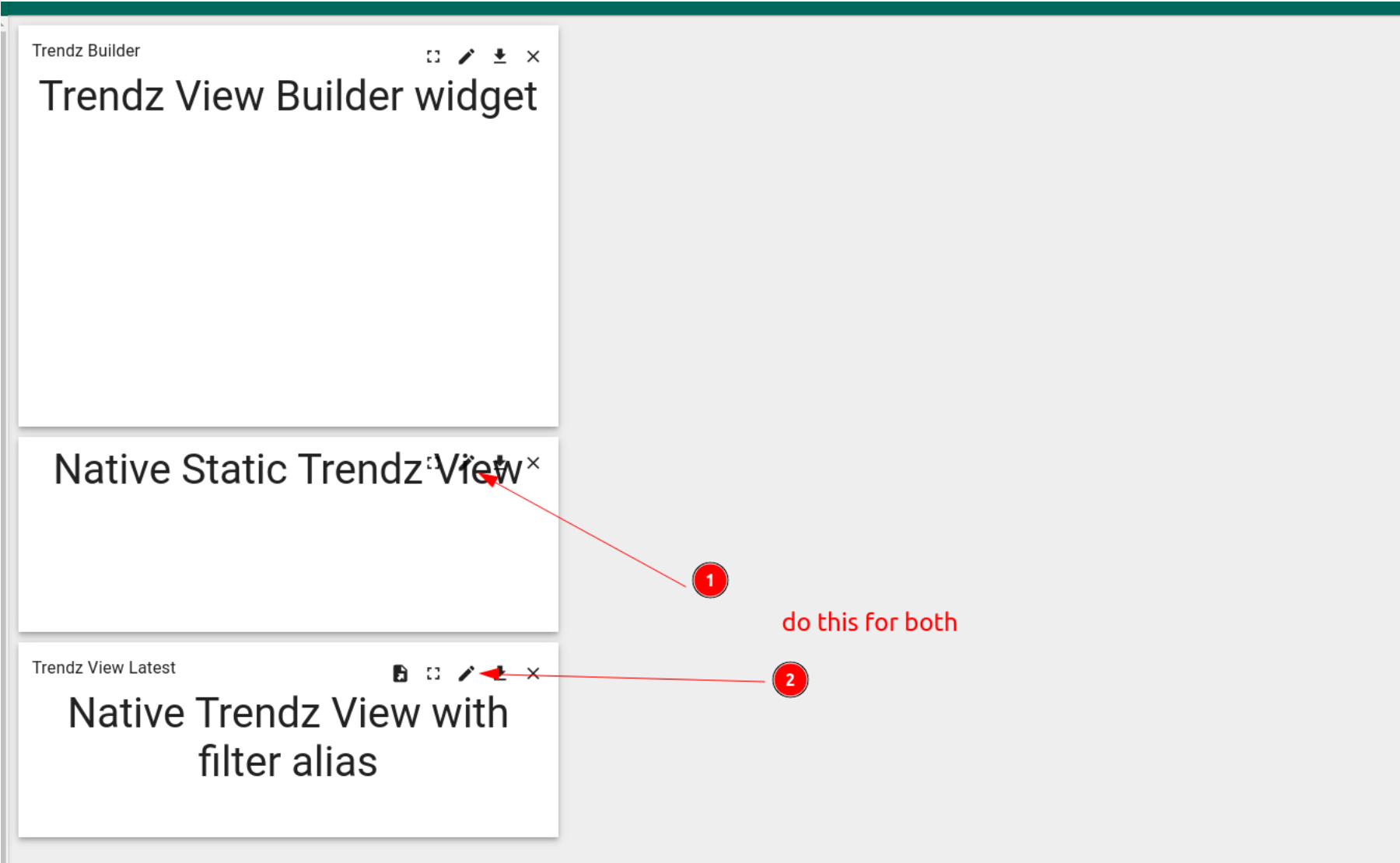
- For each widget in SENTIENT ANALYTICS bundle
- Open for edit
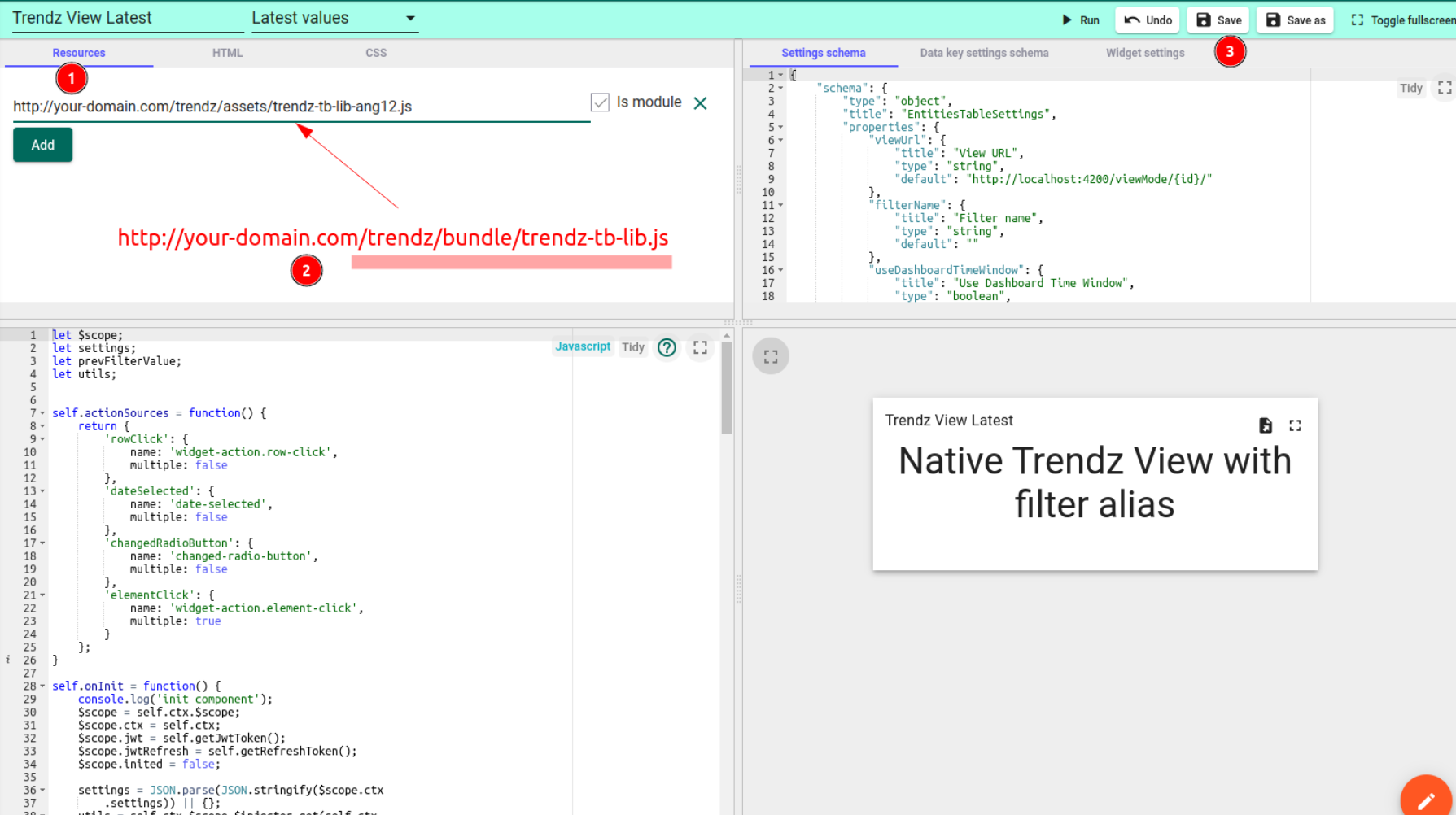
- Switch to resources tab (top left corner)
- Update link to SENTIENT ANALYTICS library
- In case of SENTIENT/SENTIENT ANALYTICS cloud (North America) use the following URL - https://sentient.cloud/sentient-analytics/bundle/sentient-analytics-tb-lib.js
- In case of SENTIENT/SENTIENT ANALYTICS cloud (Europe) use the following URL - https://eu.sentient.cloud/sentient-analytics/bundle/sentient-analytics-tb-lib.js
- Save widget
- Navigate to your dashboard and refresh the page - issue should be solved
Wrong bundle version
If after importing SENTIENT ANALYTICS Widget Bundle into SENTIENT, widgets do not work and white screen with error displayed - double-check that correct bundle was imported. Widget API in SENTIENT v2.x and v3.x is different. Ensure that you downloaded bundle for the correct SENTIENT version.
HTTPS to HTTP links
If SENTIENT uses HTTPS and link to SENTIENT ANALYTICS library uses http - you will see mixed content error in browser console and widget will not load. You should enable HTTPS for SENTIENT ANALYTICS as well.
Next Steps
-
Getting started guide - These guide provide quick overview of main SENTIENT ANALYTICS features.
-
Installation guides - Learn how to setup SENTIENT on various available operating systems.
-
Metric Explorer - Learn how to explore and create new metrics with SENTIENT ANALYTICS Metric Explorer.
-
Anomaly Detection - Learn how to identify anomalies in the data.
-
Calculated Fields - Learn about Calculated fields and how to use them.
-
States - Learn how to define and analyse states for assets based on raw telemetry.
-
Prediction - Learn how to make forecasts and predict telemetry behavior.
-
Filters - Learn how filter dataset during analysis.
-
Available Visualizations - Learn about visualization widgets available in SENTIENT ANALYTICS and how to configure them.
-
AI Assistant - Learn how to utilize SENTIENT ANALYTICS AI capabilities.